Dashboard tour
What the numbers mean and how to read them.
Your worlds list
The main dashboard shows every world you've registered. Each card shows a status badge, a recent-activity indicator, and a key-reveal button. Badges you'll see:
- Waiting for first beacon — world is registered but hasn't fired a beacon yet. Binds on the first join after upload.
- Active — world is live and receiving beacons
- Deleted on VRChat — our daily check couldn't find this world on VRChat's API. Data preserved.
- Unlisted — world is no longer marked public on VRChat
Time range & refresh
The 7d / 30d / 90d selector scopes every stat and chart on the page. The Refresh button re-fetches everything in place (with a short cooldown) — numbers never stream live on their own.
Overview stats

Online Now
Sessions with a join event in the last hour and no subsequent leave. Counts players currently in any instance of your world across all regions. (Your world's public page shows a related number computed slightly differently — beacon activity in the last 15 minutes — so the two can briefly disagree.)
Visits
Visits in the selected time window. One visit = one player's session within an hour, so a crash-rejoin a minute later still counts as a single visit. We deliberately don't claim person-level "unique visitors" — the beacon carries no player identity, by design.
Avg Session
Average session duration in seconds, computed from paired join/leave events. Sessions without a matching leave (player crashed, force-closed VRChat) aren't counted.
Weekly report
A collapsible panel at the top of each world's page covering the last completedMonday–Sunday week vs the week before: visits with the trend, your biggest day, average visit length and the share who leave within a minute, your most-visited zone, and a Quest-performance warning when frame rates look rough. It stays hidden until two full weeks of data exist, rolls over every Monday, and has a Share as image button that renders the report as a card you can post anywhere.
Charts
- Daily visits — visits per day
- Platform breakdown — PC VR / desktop / Quest share
- Peak hours — which hours of the day see the most traffic
- Day-of-week heatmap — traffic intensity across weekdays × hours
- Session distribution — how long players typically stay
- VR vs desktop — share of sessions played in VR (PC VR or Quest) vs flat-screen
- FPS health — frame-rate distribution per platform, sampled every minute in-world
- Instance size — how many players were already in the instance when someone joined
Zone table
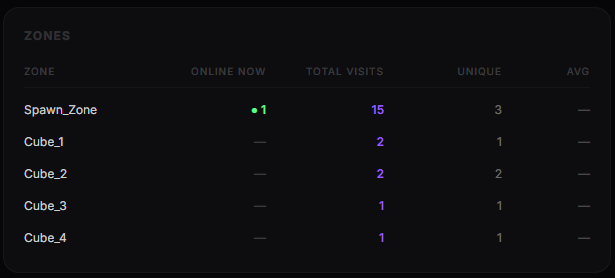
If you set up a Zone Beacon, each zone shows four columns: Online now (green dot = live count), Entries (every zone crossing), Visits (distinct sessions), and average dwell. Overlapping zones count a player in each overlapping zone — expected behavior for nested areas likefirst_floor containing lobby.
Suspicious source warning

When beacons arrive with a User-Agent that doesn't look like a VRChat client (curl, scripts, browsers), they're flagged. A small number is noise (occasional bot scans). A sustained count from a few IPs suggests someone is spamming your endpoint — consider rotating your setup key.
Data export
Each world page has a CSV export button that dumps the raw events for your own off-platform analysis. Includes timestamps, event types, session IDs, platforms, and durations.
Your world's public page
Every active registered world also gets a beacon-powered public page with a players-online chart, Visits · 7d, and your Pulse score — full details in Pulse & public pages.